Call Now
 Seen it cheaper? We'll match the price.
 Aussie Owned



-

- In Car Tech
- Accessories
- CAN Bus Interface
- Aerpro SAGM02 InfoLink Adapter To Suit Holden Colorado, Trailblazer, Equinox, Acadia & Astra 2017-on (OEM Camera via APVGM01)
 learn more>>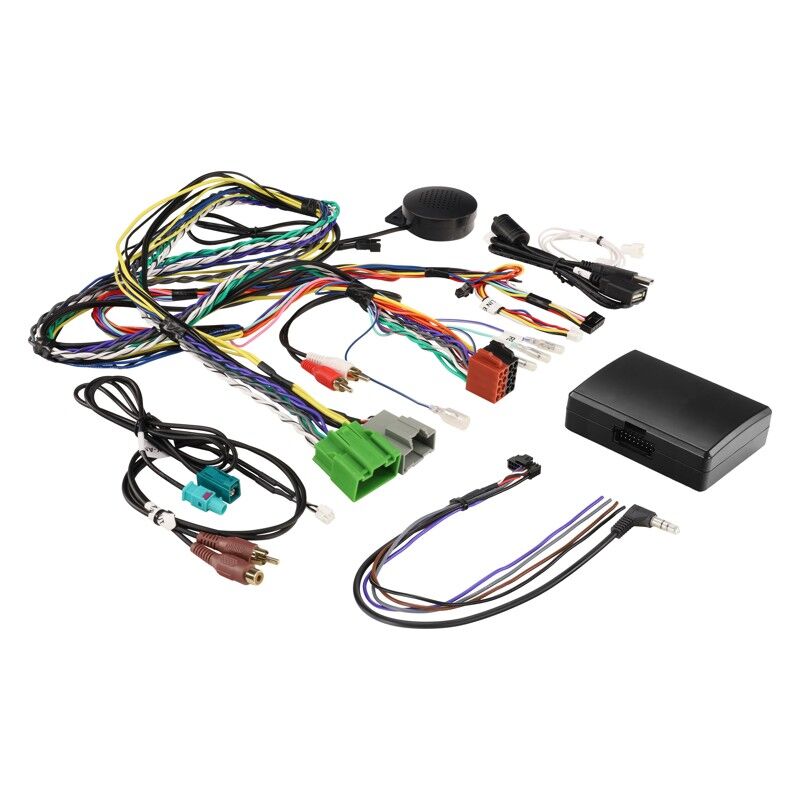
Aerpro SAGM02 InfoLink Adapter To Suit Holden Colorado, Trailblazer, Equinox, Acadia & Astra 2017-on (OEM Camera via APVGM01)
SKU:SAGM02
$399.99
Retain steering wheel controls, vehicle menus, HVAC display and parking sensors when fitting an aftermarket head unit to your 2017-on Holden with the Aerpro SAGM02 InfoLink adapter. Factory reverse camera retention requires APVGM01 (sold separately).
- Retains steering wheel control functionality for seamless operation.
- Provides on-screen access to vehicle menus, HVAC visualisations, and parking sensors.
- Auto-detects reverse camera input (PAL/NTSC) for quick setup.
- Supports reverse camera display (if equipped) for safer reversing.
- Supports rear cross traffic alerts over reverse camera (model dependent)
- Offers selectable dipswitch settings for simple configuration and installation.
- Outputs for speed pulse, park brake, and reverse signals for enhanced system compatibility.
- Multi-language support including English, German, Spanish, Italian, and French.
- Software updateable for long-term reliability and performance.
To suit vehicle:
- Chevrolet Silverado 2014-2019
- Holden Trailblazer 2017-
- Holden Equinox 2017- EQ
- Holden Acadia 2017- AC
- Holden Astra 2017-2020 BL
- Holden Colorado 2017-2020
(SAGM02)
INTERFACE TYPE: INFOLINK
PATCH LEAD TYPE: SW
PHONE BUTTON COMPATIBILITY: YES
VOICE ASSISTANT BUTTON SUPPORT: YES
OUTPUTS:
- REVERSE TRIGGER: YES (PURPLE/WHITE)
- PARK BRAKE: YES (GREEN)
- SPEED PULSE: YES (PINK)
- ILLUMINATION: YES
- AMP REMOTE: YES
- TELEPHONE MUTE: NO
OTHER RETENTION:
- OEM AMPLIFIER: NO
- OEM REVERSE CAMERA: SOLD SEPARATELY (APVGM01)
NOTES:
- Steering Wheel Control Interfaces vary between models, to find the correct part for your vehicle use the Aerpro Vehicle Selector.
- Aftermarket headunit must be SWC compatible and Steering Wheel Control Functions may vary from the OEM Functions.
- Aftermarket headunit requires a rear camera input.
- Not compatible with high-definition cameras
- SWC Configuration: On first installation, steering wheel controls may operate incorrectly. To switch SWC mode, press the Track Down button 5 times quickly. The interface will then change to the correct configuration.
- Do not plug the LIN-EXT into the video output of the SAGM02 Module
 SSV Street Sound & Vision
 Phone:
  Mail:
Mail: